Architecture
Code Mode Pattern
Section titled “Code Mode Pattern”drawmode exposes three MCP tools: draw (generate/edit diagrams), draw_describe (convert .excalidraw to TypeScript), and draw_info (capabilities reference). The LLM writes TypeScript code against the Diagram SDK:
- LLM receives the
drawtool with SDK type definitions (~100 lines) - LLM writes code using the
Diagramclass executor.tsruns code vianew Function("Diagram", code)with aConfiguredDiagramsubclass- SDK runtime validation catches errors at call time — invalid IDs, wrong element types, missing dependencies throw actionable errors the LLM can self-correct on
- Zig WASM (Graphviz C statically linked) handles layout positioning and arrow routing via the
dotengine - WASM structural validation checks the rendered output (bound text, duplicate IDs, overlapping shapes)
- Output:
.excalidrawfile, excalidraw.com URL,.pngfile, or.svgfile
Project Structure
Section titled “Project Structure”drawmode/├── src/ # TypeScript (MCP server + SDK)│ ├── index.ts # MCP server entry point (stdio + HTTP)│ ├── sdk.ts # Diagram SDK (addBox, connect, render, etc.)│ ├── executor.ts # Local executor (new Function + Diagram subclass)│ ├── layout.ts # Layout bridge (loads Zig WASM with statically-linked Graphviz)│ ├── upload.ts # Excalidraw.com upload (encrypt + POST)│ ├── png.ts # Image export (PNG/SVG via puppeteer + Excalidraw CDN)│ ├── types.ts # Shared types (ColorPreset, ShapeOpts, ConnectOpts, etc.)│ ├── sdk-types.ts # SDK type definitions string (embedded in tool description)│ └── widget.html # MCP Apps HTML widget for Claude Desktop/Cowork├── wasm/ # Zig WASM module│ ├── src/│ │ ├── main.zig # WASM exports (alloc, resetHeap, layoutGraph, routeArrows, validate)│ │ ├── layout.zig # Graphviz layout (C lib statically linked)│ │ ├── arrows.zig # Arrow routing│ │ ├── validate.zig # Structural validation│ │ ├── compress.zig # Zlib compression (RFC 1950/1951)│ │ ├── font.zig # Font metrics│ │ └── util.zig # Shared utilities│ └── build.zig├── worker/ # Cloudflare Worker entry point (remote MCP)│ ├── index.ts│ └── wrangler.toml├── package.json└── tsconfig.jsonLayout Engine: Graphviz
Section titled “Layout Engine: Graphviz”The primary layout engine is Graphviz — the C library is statically linked into the Zig WASM module (drawmode.wasm).
dotlayout: Layered graph layout (Sugiyama algorithm) with proper crossing minimizationsplines=ortho: Orthogonal edge routing for vertical layouts (TB/BT); curved splines for horizontal layouts (LR/RL)- Cluster subgraphs: Groups rendered as Graphviz clusters for proper containment
rank=same: Nodes with samerowvalue share a rank in the layout- Coordinate conversion: Graphviz points (Y-up) → Excalidraw pixels (Y-down)
Zig WASM Module (drawmode.wasm)
Section titled “Zig WASM Module (drawmode.wasm)”A single Zig WASM binary with Graphviz C statically linked. Handles layout, edge routing, and validation:
WASM exports:
| Export | Description |
|---|---|
alloc / dealloc | Bump allocator memory management |
resetHeap | Reset bump allocator between calls |
layoutGraph | Primary layout engine (Graphviz Sugiyama with orthogonal edge routing) |
routeArrows | Arrow endpoint routing |
validate | Structural validation (bound text, duplicate IDs, overlapping elements) |
zlibCompress | Zlib compression for excalidraw.com upload |
Input/output is JSON bytes — the TypeScript layer serializes to JSON, passes to WASM, and reads back results.
Two-Layer Validation
Section titled “Two-Layer Validation”Layer 1: SDK runtime validation (at call time)
Every SDK method validates its inputs before modifying state. This catches errors immediately with actionable messages:
connect(from, to)— both IDs must be nodes (not groups or frames)addGroup(label, children)/addFrame(name, children)— all children must exist; frames cannot be nestedmessage(from, to)— both IDs must be actorsupdateNode(id)/updateEdge(from, to)— target must existremoveGroup(id)/removeFrame(id)— target must exist
Layer 2: WASM structural validation (after render)
Post-render checks on the generated Excalidraw JSON:
- Bound text elements have matching containers
- No duplicate element IDs
- Arrow endpoints reference valid elements
- No overlapping elements
Excalidraw JSON Internals
Section titled “Excalidraw JSON Internals”The SDK handles these Excalidraw quirks so the LLM doesn’t have to:
- Labels need two elements: shape with
boundElements+ text withcontainerId - The
labelproperty does NOT work in raw JSON - Elbow arrows need:
elbowed: true,roundness: null,roughness: 0 - Arrow x,y must be on source shape edge, not center
- Multiple arrows from same edge must be staggered (20%, 35%, 50%, 65%, 80%)
Image Export Pipeline
Section titled “Image Export Pipeline”PNG and SVG export uses headless Chrome (puppeteer) to load the Excalidraw library from CDN and call ExcalidrawLib.exportToSvg() — the same rendering pipeline as the Excalidraw web app.
- PNG: SVG → canvas at 2x resolution →
toDataURL("image/png") - SVG: Direct
XMLSerializer.serializeToString()of the SVG element - CDN: Pinned to
@excalidraw/excalidraw@0.17.6 - Optional:
puppeteeris inoptionalDependencies— PNG/SVG export gracefully fails if not installed
System Overview
Section titled “System Overview”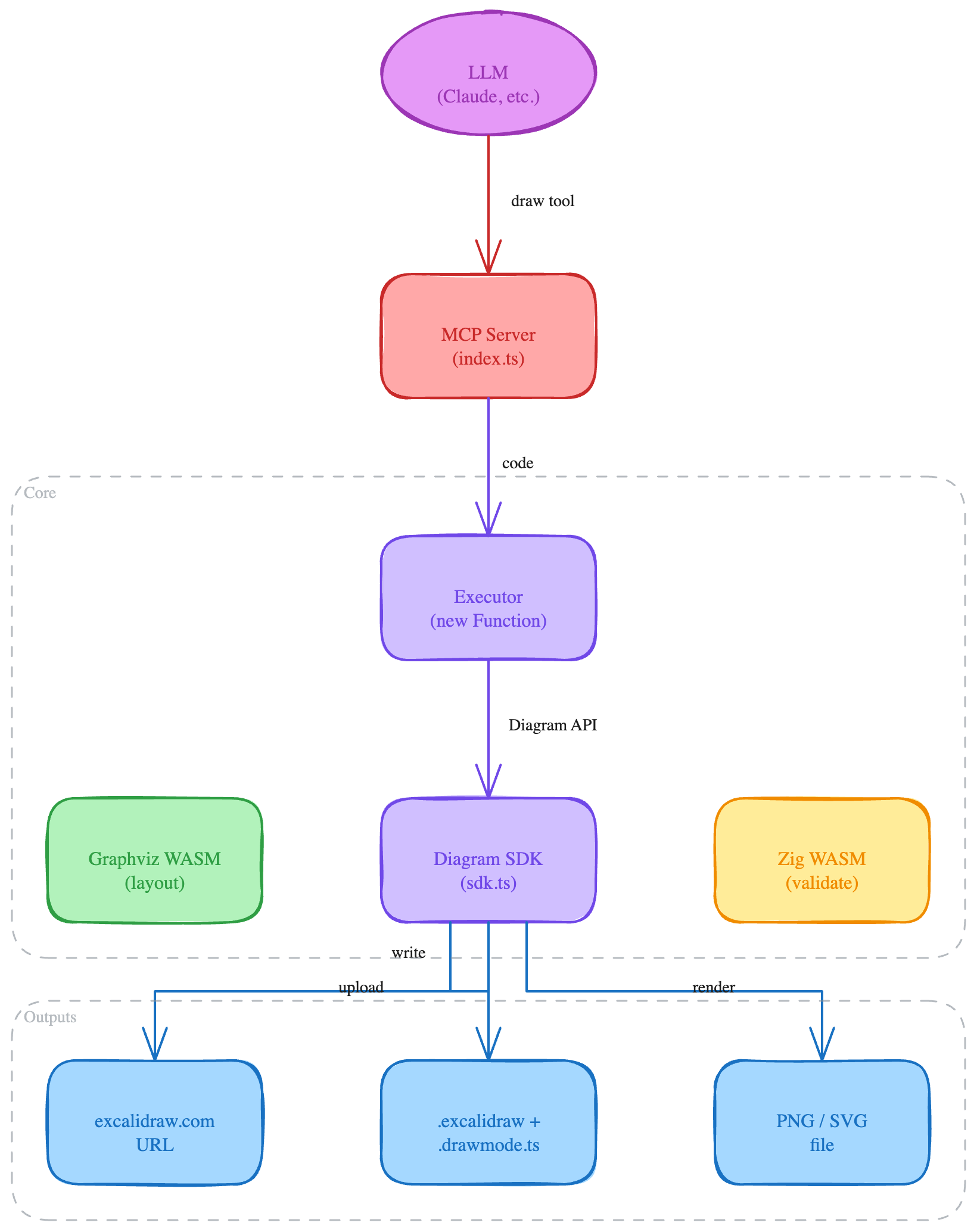
Dependencies
Section titled “Dependencies”TypeScript
Section titled “TypeScript”| Package | Purpose |
|---|---|
@modelcontextprotocol/sdk | MCP protocol (McpServer, transports) |
zod | Schema validation for MCP tool parameters |
puppeteer (optional) | Headless Chrome for PNG/SVG export |
No external dependencies. Standard library only.
Development
Section titled “Development”pnpm install # Install dependenciespnpm build # Build TS + WASM (Zig failure non-fatal)pnpm build:wasm # Build WASM module onlypnpm dev # Dev server (HTTP mode)pnpm test # Run testspnpm typecheck # TypeScript type checking
cd wasm && zig build # Build WASM module onlycd wasm && zig build test # Run Zig tests